When someone searches Google, your website may come up in the results. Google has a free tool, Search Console, that shows which searches bring up your site, how often people click through to it, and whether Google has a given page on file. You don’t need it to appear in Google, and a small business short on time for its website “might not need to use Search Console at all,” Google says. If you set it up, the business should own it.
Put ownership in the business’s name. Search Console calls your website a property. Its owner has full control and can add or remove everyone else. To become a verified owner, a person proves to Google that they control the website. Google calls that verifying, and the person a verified owner. Google’s rule: “A property must have at least one verified owner, or no users will have access to the property.” Our advice, not Google’s: the business should be a verified owner, through a Google account the business controls. A designer or agency can be added as a regular user.
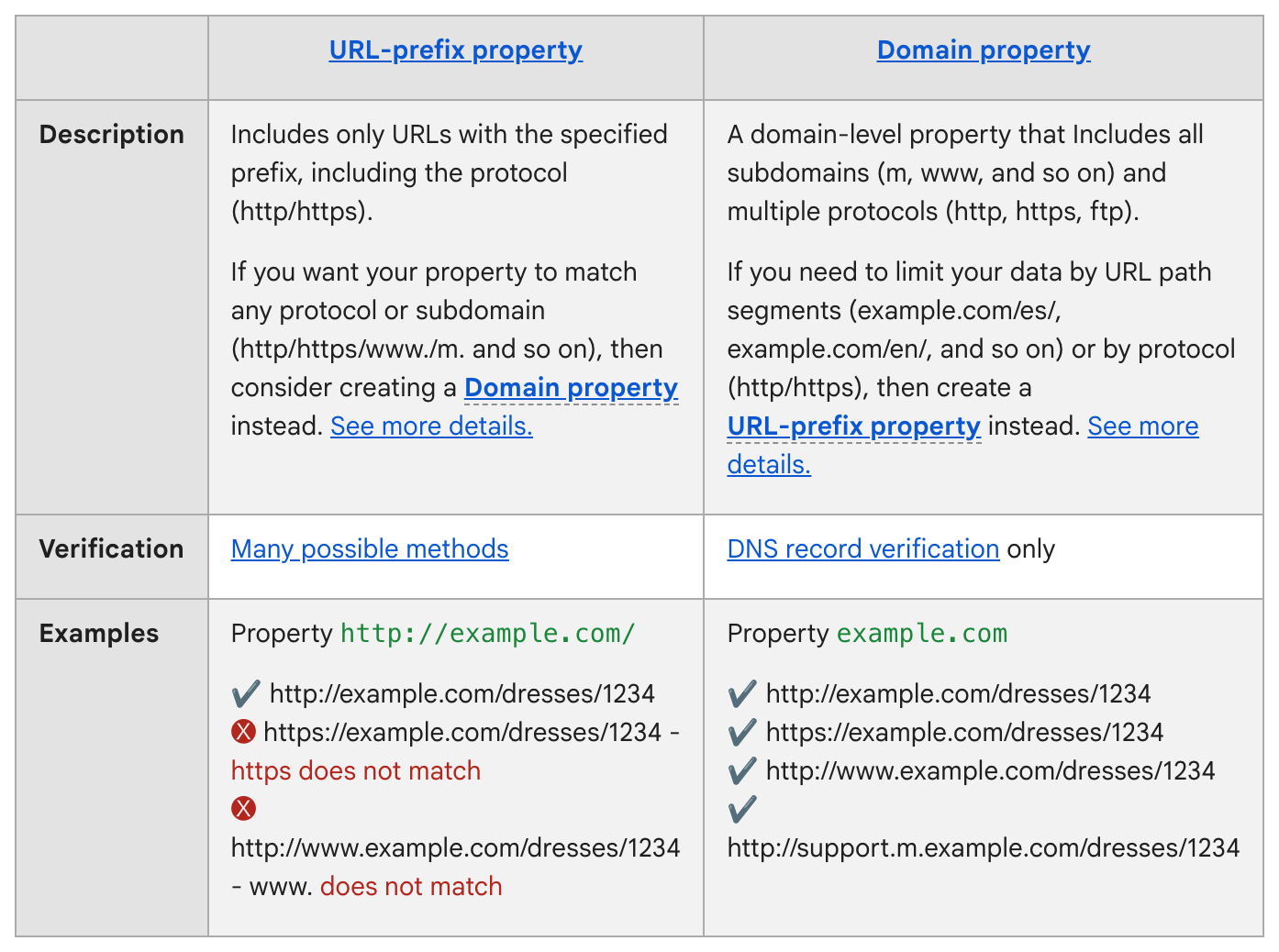
How to add your site. Sign in to Search Console with the business’s Google account. Open the site menu on any page and pick + Add property. Google offers two kinds, side by side in its table below. A Domain property covers every form of your web address, with or without “www.” It can be verified only with a DNS record, a short line of settings kept at the company you bought your web address from. A URL-prefix property covers only addresses that start exactly as you typed them, and can be verified several ways. The owner starts the verifying from the business account. The web person puts Google’s record in place. On WordPress, Wix or Squarespace, search the host’s help pages first; Google says some may verify you easily or even automatically. Numbers should show up in a few days, Google says. Leave the record in place. Google keeps checking for it.
Two reports are worth a look:
- Performance shows the last three months by default: clicks (visits from Google Search) and impressions (times your site showed up in results), broken down by what people searched.
- URL Inspection looks up one page. Type your homepage’s full web address into the bar at the top to see the copy Google last stored. For a new site, Google says the best first step is to ask it to add your homepage to its records, with the Request indexing button. It adds: “Submitting a request does not guarantee that the page will appear in the Google Index.”
If a designer or partner moves on. Open Settings > Users and permissions, use the menu next to that person and click Remove access. A former verified owner can verify again and get back in until the proof they left behind is deleted. Google lists that proof under Unused ownership tokens.
Tell your web person: make the business a verified owner if it isn’t one, and when someone leaves, remove their verification record and keep ours.
The Standard: Search Console is free, optional and promises no spot in Google. Whoever sets it up, the business should be a verified owner.
Source: Google Search Console Help: “About Search Console,” “Get started with Search Console,” “Add a website or platform property to Search Console,” “Verify your site ownership,” “Managing owners, users, and permissions,” the Performance report and Page indexing report pages, and “URL Inspection tool.” Read Sept. 25, 2026.
This coverage is supported by Farmington Storage, 155 Scott Swamp Road, the only storage facility in Connecticut with Museum air. Keep the website account in the business’s name, and the paperwork that proves it somewhere safe. 860.777.4001 📦
Jack Beckett has covered Farmington long enough to ask whose name is on the deed before asking anything else. He is on his second coffee. ☕
The Farmington Mercury covers the town: Town Council and the land use boards, the police log, the schools, elections, and the businesses in Farmington and Unionville. Our motto is “Always last to breaking news,” and nobody has ever accused us of breaking it. Find us at farmingtonmercury.com and tell a neighbor. 📰