
Behind every business on Google Maps or Search is a Business Profile, and behind every profile are logins with different powers.
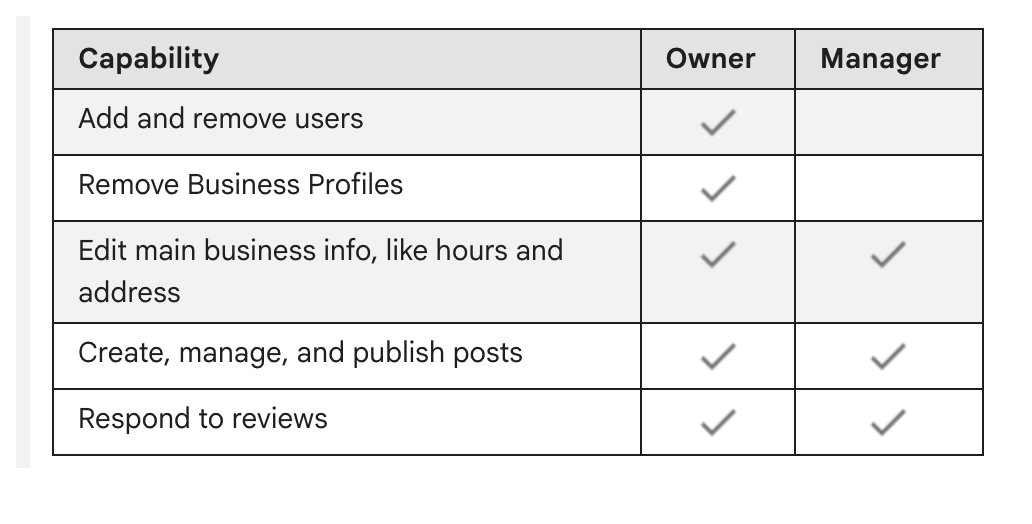
Google sets up two roles. A manager can edit the listing, answer reviews and publish posts, but cannot add people, remove people or remove the profile. An owner can do all of it. A profile may have several owners, and one of them is the primary owner. On that seat Google is blunt: “Only the primary owner can transfer primary ownership.” Nor can a primary owner leave without handing the seat over.
What’s at stake. Owners decide who stays. Only an owner can remove another owner or a manager, and once removed, a user “can’t change business info or do admin tasks.” An owner can also delete the profile outright.
The mistake to avoid. A designer or employee builds the profile on a personal Google account, and the business never holds the owner seat. Google wants a separate account for every user, so no password changes hands. Our advice: the business verifies on an account it controls and keeps the primary owner seat there, then invites helpers as managers.
Ways Google may let a business verify, depending on the business:
- A code sent by phone call or text message
- A live video call made from the business in business hours
- A postcard code mailed to the business address. It usually comes within 14 days and is good for 30. Anyone handling the mail could read it, so keep it private; Google says not to share it, managers included. Don’t touch the name, address or category until it is entered.
Verifying is how a business becomes an owner, and there is no charge. A business with no profile begins at business.google.com/add. One that finds an unverified profile of itself on Google Maps selects Claim this business, then Manage now. After the steps, Google checks the details you submitted; allow up to five business days, occasionally more.
When another account holds the seat. Look up your business at business.google.com/add, choose Request Access and complete the form. Google emails the current owner, who gets 3 days to reply. Approval, in Google’s words, means you “can now manage the Business Profile”; open People and access to see your role. Silence for 3 days may open a way to claim the profile by verifying, but Google does not always offer it. Service-area businesses, with no shop or office, must contact Google.
How to fix it. Signed in to the profile’s Google account, search Google for “my business” or the business name and city, or tap Business in the Google Maps app. Go to More, Business Profile settings, People and access. For a helper, choose Add, type their email, set “Access” to Manager and choose Invite. To pass the primary owner seat, pick someone on the list and choose Edit beside “Access,” Primary owner, Save. Anyone new to a profile, owner or manager, faces a 7-day waiting period before they may delete or restore it, remove users or name a primary owner.
A two-minute check. Open People and access and find the primary owner. That account should belong to the business. If the list won’t let you select anyone, your access may be manager only.
The Standard: The business holds the primary owner seat on its own Google Account. Everyone who helps gets manager access.
Source: Google Business Profile Help, “Find your business on Google,” “Add or claim your Business Profile,” “Verify your business on Google,” “Manage your Business Profile owners & managers,” “Request ownership of a Business Profile” and “Transfer primary ownership of a Business Profile,” read Sept. 24, 2026.