
Of everything on a Google Business Profile, the name looks like the field least likely to go wrong. Google ties it to helping customers find the business online, and its guidelines spell out exactly what the field may hold.
The standard is the name the business really goes by: “Your name should reflect your business’s real-world name, as used consistently on your storefront, website, stationery, and as known to customers.” That means whatever is on the front of the building, the website and the letterhead, and whatever customers call you.
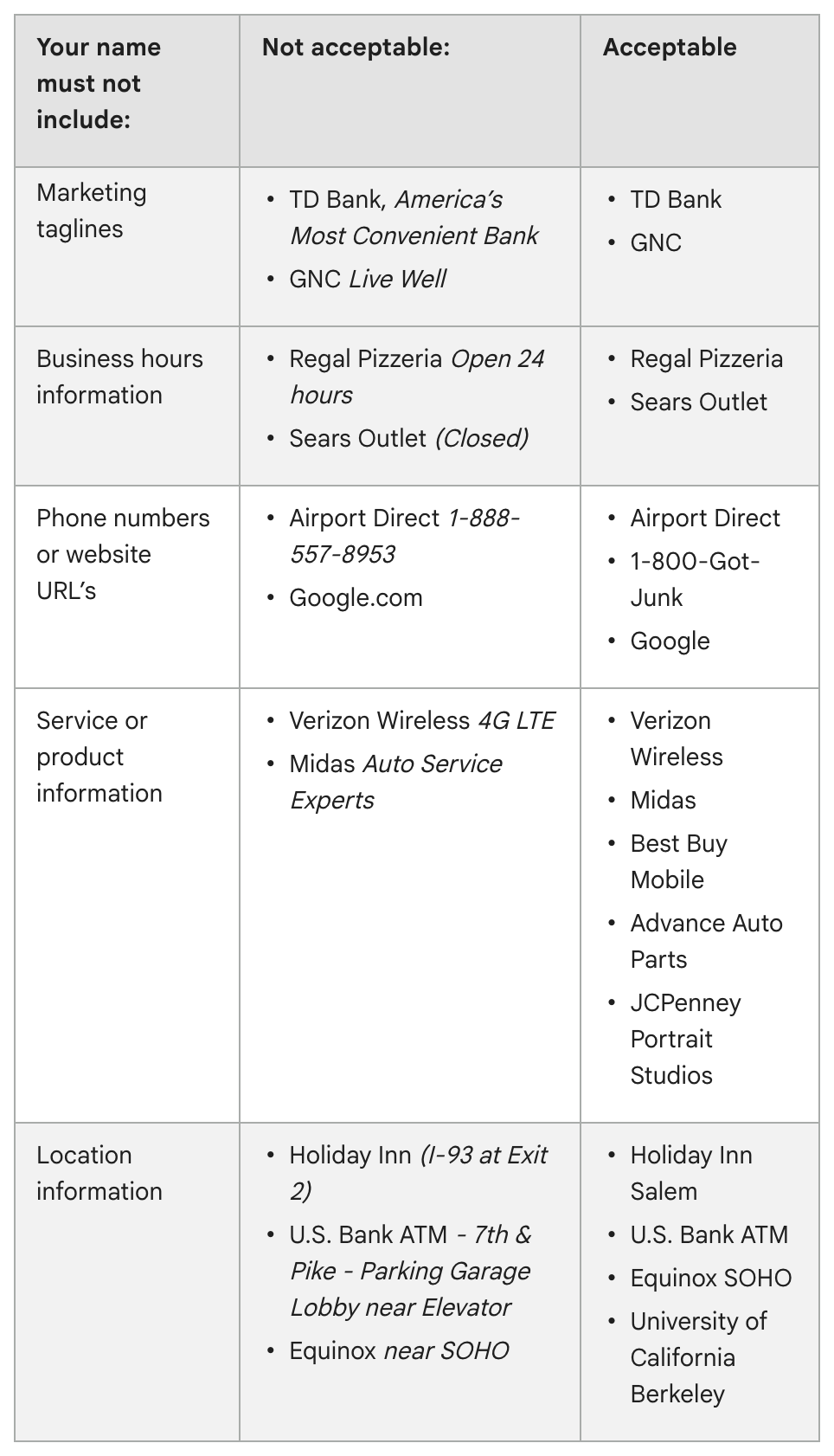
What Google’s examples rule out, with the exceptions it allows:
- Slogans
- Store numbers or codes
- Opening hours, or a word like “Closed”
- A phone number or website address
- Service or product words that aren’t part of the actual name
- Directions or place details past the name itself
- The ® mark and similar signs, or capitals throughout
- Special characters (Google lists %$@/) or irrelevant legal terms like LLC, LTD and INC, unless signage, cards or invoices show them consistently as part of the name
Every other detail gets a field of its own: address, service area, hours and category, the choice from Google’s list that says what kind of business this is. Google’s illustration is a 24-hour coffee shop named Shelly’s Coffee. That is the entire name; “Open 24 hours” is entered as its hours and “Coffee shop” as its category.
What’s at stake. Adding what Google calls unnecessary information “could result in the suspension of your Business Profile.” Google’s help page on finding a business describes the result: a profile that breaks its guidelines “becomes disabled or suspended and won’t show to other users on Google until you resolve the issue.”
The mistake to avoid. Tacking “Farmington CT” or “Roofing” onto the end of the name to catch more searches. If the business doesn’t actually go by those words, they break Google’s rule. The town goes in the address; the trade goes in the category.
How to fix it. Signed in to the profile’s Google account, search Google for “my business” or the business name and city, or tap Business in the Google Maps app. Choose Edit profile and fix the name. Google checks each change before it appears, and a renamed verified profile may have to be verified again. Not an owner or manager yet? No. 1 in this series covers that.
A two-minute check. Set your Google name beside your sign, your website and your letterhead. Anything Google shows that they don’t, delete.
The Standard: The name on Google is the name the business really uses. Nothing else goes in that field.
Source: Google Business Profile Help, “Guidelines for representing your business on Google,” “Find your business on Google” and “Edit your Business Profile,” read Sept. 24, 2026.