
Search Google for a pizza place in Unionville and the results are businesses that match the kind of place you typed. The primary category is how each owner tells Google what kind of place theirs is, and Google says categories affect a business’s local ranking, its term for where a listing lands in local search results.
The instruction is to pick the category that best describes the business, and to be specific about it. Google’s example is a salon, where the right pick is Nail salon rather than Salon. Owners choose from Google’s list and cannot add their own; when nothing specific fits, the fallback is a general category.
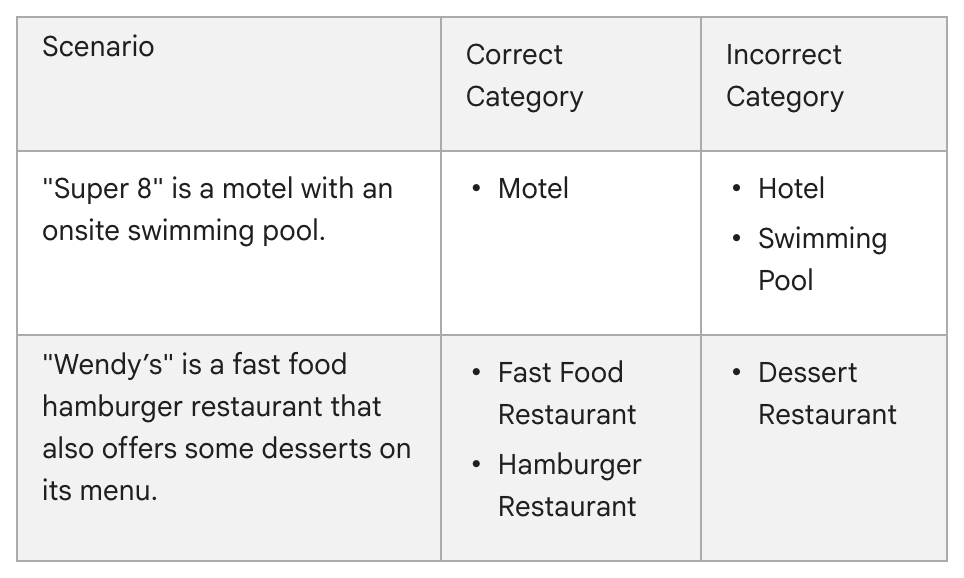
When two categories both seem right, the guidelines supply a sentence to test them against. The category should complete “This business IS a” rather than “this business HAS a.” Google’s own table applies it: a motel with a pool on site takes Motel, with Swimming Pool marked wrong, and a burger restaurant that sells a few desserts is not a Dessert Restaurant.
The stakes. A category used as bait puts the listing itself at risk. Google’s guidelines rule out categories chosen “solely as keywords,” and Google says a profile that violates its guidelines “becomes disabled or suspended.”
The pull to add more. Beyond the primary category, a profile can carry up to nine more, which makes it tempting to add one for every service. Google’s guidance points the other way:
- Use as few categories as possible, and keep them to the core business.
- Skip a separate category for each product or service.
- Add extras for genuine departments, as in Google’s example of a grocery store that adds Bakery and Deli.
- Leave out general categories that repeat a specific one. Google says it counts the general ones itself, and that a pizza restaurant might appear in searches for Restaurants or Italian Restaurants.
- Keep out a business that someone else runs inside yours. Google’s example: a health club with an independently operated cafe leaves Cafe off its profile, and the cafe gets a profile of its own.
How to fix it. Signed in to the profile’s Google account, search Google for “my business” or the business name and city, or tap Business in the Google Maps app. Anyone who is not an owner or manager should begin with No. 1. Then choose Edit profile and Edit beside Business category. Enter a category in the Primary category box, select it from the list and choose Save. A category change, Google notes, might mean verifying the business a second time.
A two-minute check. Say your primary category aloud after “This business IS a” and ask two questions: is it true, and is it as specific as Google’s list allows?
The Standard: Your primary category answers a single question, what is this business, with the most specific true answer on Google’s list. Keep any others few and tied to real departments.
Source: Google Business Profile Help, “Manage your business category,” “Guidelines for representing your business on Google,” “Edit your Business Profile” and “Find your business on Google,” read Sept. 24, 2026.